


Welcome
- Details
- Written by: admin
- Category: Willkommenstexte
-
Also available:


- Hits: 30383
Welcome on BeSly the Haiku knowledge base.
This site are created to help other users and developers. What to start, has begun in August 2004 with only German translations and little tutorials has now become a comprehensive, informative, multi-lingual knowledge base.
It contains a variety of assistance to install, program descriptions, program and system settings. We always try to make the tutorials easy to understand with a simpe but effect layout. In the years the site is online many ideas are included into the website. Idears from other users, like the system information at the beginning of every tutorial.
The menu structure is designed so that all instructions are displayed sorted by their program type. You can also use the search function to find tutorials.
There is also a small Software that allows you to find BeSly tutorials. Here also all programs listed by there program type, but also by the system type, language or authors. Even the smallest instructions are included, usually found only in collections of "Tips and Tricks".
Due to the similarity between the systems, wich are all have the same basis or be a rebuild, many of the tutorials are applicable on all systems.
Who wants to help this project, can do this writing their own tutorials, descriptions or translations. Also ideas or criticisms are welcome.
With the relaunch of BeSly it is now possible for the user to write the instructions themselves in the web interface. Even uploading pictures should be no problem. The only condition is to log on the BeSly. Your data will not pass from us.
How to set the App Version and Description long text
- Details
- Written by: lorglas
- Category: Development
- Hits: 4376
Sometimes you want to add the Version Info and a description to your program.
In this example you can see that the version and description (Beschreibung) is empty.
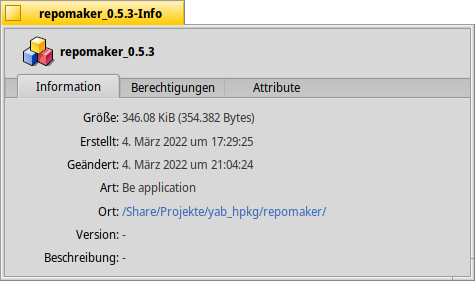
To set this, you can use the command setversion over the terminal. to do that, open the Terminal and type setversion -h and press Enter.
| setversion -h |
After this you get this information.
|
setversion: you did not specify any version Usage: setversion filename |
To set the version and the description you can use the example code below.
Example code:
|
setversion /Share/Projekte/yab_hpkg/repomaker/repomaker_0.4.5 -app 0 0 0 -long "This is a tool to manage your own Repository" |
In this example i define the location of the app. After that, i write the version for major middle minor.
 |
Keep in mind, that between the major middle and minor value is a space, not another character. No Minus or dot or somethink else. |
After the minor string it is possible to set the long version info text with
| -long "This is a tool to manage your own Repository" |
If you set the app version and the long description with the previous example code, you get this result.
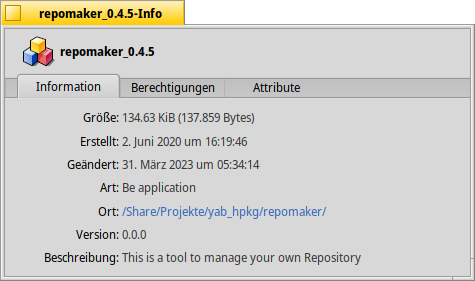
Here are a list of further option, but i didn't test it right now.
| d | development |
| a | alpha |
| b | beta |
| g | gamma |
| gm | goldenmaster |
| f | final |
Outrun Deluxe in EGSL
- Details
- Written by: lorglas
- Category: EGSL
-
Also available:
- Hits: 541
1. Introduction
We wanted to create a small Outrun Deluxe in EGSL (Easy Gaming Scripting Language by Markus Mangold). The goal was:
- A perspective road
- Player car and enemy cars
- Curves and drifting
- HUD (time, speed)
- Decorative elements such as palms
- Background music
EGSL is great for simple 2D games using sprites, rectangles, and circles. However, for creating true perspective 3D effects, there are limitations that we will explore throughout this tutorial.
2. Basic Structure
First, we defined the game variables and settings:
- Window size: Width and height of the game window
- Track parameters: Road width, segment length, drawing distance, and camera depth
- Speed settings: Maximum speed, acceleration, braking, deceleration, and drift factor
- Player state: Current speed, lateral position (playerX), track position (pos), and remaining lap time
- Colors: Top and bottom sky colors for the gradient
- Arrays: One for track segments (track) and one for enemy cars (cars)
- Sprites: Player car, enemy car, and decorative elements like palms
Example initialization in EGSL:
|
-- Fenstergröße -- Strecke -- Geschwindigkeit -- Spielerzustand -- Farben Himmel -- Arrays -- Sprites |
This foundation sets up all variables we will need for the track, the player, the enemies, and the graphics.
Next, we would implement track generation, player/enemy updates, and rendering, building upon these basic structures.
3. Generating Track and Enemies
We created the road as a table of segments. Each segment contains:
- curve → The curvature of the segment
- y → Elevation of the segment
- color → Road color
- deco → Random decoration, such as palms
Example in EGSL:
| function createTrack() for i = 0,799 do local s = {} s.curve = math.sin(i*0.04)*2 + math.sin(i*0.01)*4 s.y = math.sin(i*0.02)*50 s.color = (i % 2 == 0) and {r=70,g=70,b=70} or {r=60,g=60,b=60} s.deco = (math.random(0,4) == 0) table.insert(track, s) end end |
Enemy Cars Placement
The enemy cars are randomly distributed along the track to create a dynamic challenge for the player. Each enemy’s position along the track (z) and lateral offset (x) is chosen randomly:
| function spawnCars() for i = 1,20 do local c = {} c.z = math.random() * (#track * SEG_LEN) c.x = math.random()*2 - 1 c.speed = MAX_SPEED*0.6 + math.random()*50 c.sprite = enemySprite table.insert(cars, c) end end |
This ensures that:
- Enemies appear at different distances from the player
- Lateral positions vary, so the player must steer to avoid collisions
- Speed differences create overtaking dynamics
By looping through this table each frame, the enemies move forward along the track and loop back to the start when reaching the end. This gives the appearance of continuous traffic.
4. Player Movement
The player’s movement is frame-based and takes into account:
- Speed, acceleration, and braking
- Drifting, which depends on speed and track curves
- Collisions with enemy cars, reducing speed
|
function update() return true end -- Geschwindigkeit speed = speed + ACCEL speed = speed - BRAKE speed = speed - DECEL end -- Drift playerX = playerX - DRIFT_FACTOR*(speed/MAX_SPEED) end playerX = playerX + DRIFT_FACTOR*(speed/MAX_SPEED) end -- Position -- Gegnerbewegung c.z = c.z - #track*SEG_LEN end return false |
Key Points:
- playerX moves left/right, scaled by speed to simulate drift
- pos increases according to speed, looping when reaching the end of the track
- Collisions with enemies reduce the player’s speed, creating a risk-reward gameplay
This system is simple but effective for a pseudo-3D racing effect, as long as the rendering correctly reflects the track perspective.
5. Projection
To create a pseudo-3D perspective, we calculate the on-screen position and width of each track segment and object based on its distance from the camera (z). This gives the illusion of depth:
| function project(x,y,z) local scale = CAM_DEPTH / z local sx = (1 + scale*x) * W/2 local sy = (1 - scale*y) * H/2 local sw = scale * ROAD_W * W/2 return sx,sy,sw,scale end |
Explanation:
- scale decreases with distance, making far objects appear smaller
- sx determines horizontal position, shifted by player’s lateral offset
- sy determines vertical position, simulating height/elevation
- sw determines road width on screen
By projecting each segment and enemy, we can draw them at the correct size and position relative to the player.
 |
Important: If z is 0, this causes a division by zero, so always ensure z > 0. |
Next, we’ll see how to render the road, side stripes, and decorations using this projection.
6. Rendering the Road
This was the most challenging part, because EGSL has limited drawing capabilities:
- Only rectangles and lines (box() / fillbox()) are available.
- The road often appeared as narrow vertical strips, and green side areas sometimes overlapped the road.
- Curves were barely visible, and large sections sometimes looked uniformly gray.
- EGSL does not have polygon or triangle functions (filltriangle() is unavailable in standard EGSL), which makes proper 3D perspective difficult.
Simplified pseudo-perspective example:
|
function render() local base = math.floor(pos/SEG_LEN) for n = 0,DRAW_DIST do z1 = 0.1 end local sx,sy,sw,_ = project((playerX-x)*ROAD_W, camH-seg.y, z1) -- Straße
dx = dx + seg.curve |
 |
Observations:
|
This demonstrates EGSL’s fundamental limitation for pseudo-3D racing games. Without polygons or triangles, it is almost impossible to render a convincing Outrun-style road.
Next, we’ll discuss decorations, enemy cars, and HUD, which were easier to implement.
7. HUD, Enemies, Player, and Decorations
Once the road is projected, we can overlay the other game elements:
Enemy Cars
- Drawn with putimage() at the projected position:
|
for _, c in ipairs(cars) do
local dz = c.z - pos if dz < 0 then dz = dz + #track*SEG_LEN
end
if dz > 0 and dz < DRAW_DIST*SEG_LEN then local sx, sy, sw, scale = project(c.x*ROAD_W, 100, dz) putimage(sx, sy-20, enemySprite) end end |
- Enemies move along the track and wrap around when reaching the end
Player Car
- Always drawn near the bottom center of the screen:
putimage(W/2, H-60, playerSprite)
|
Decorations (e.g., Palms)
- Added randomly per segment based on seg.deco:
if seg.deco and n % 10 == 0 then
    putimage(sx+sw*1.2, sy-50, palmSprite)
    putimage(sx-sw*1.5, sy-50, palmSprite)
end
|
HUD (Time, Speed)
- Use bmptext() or equivalent to display player info:
bmptext(20, 20, "TIME: "..math.floor(lapTime), myfont)
bmptext(20, 50, "SPEED: "..math.floor(speed), myfont)
|
Key Takeaways:
- These elements are 2D overlays, drawn after the road
- They are relatively straightforward in EGSL
- The major visual challenge remains the road itself
This allows the game to show moving cars, decorations, and HUD, even though the pseudo-3D road is still very limited.
8. Music
| function initMusic() gamesound = loadsound("Blaster.wav") playsound(gamesound,16,2,true) end |
9. Main-Loop
|
function main() createTrack() local gameover = false break end closewindow() main() |
10. Conclusion: Is EGSL Suitable for Outrun?
Advantages of EGSL:
- Simple and beginner-friendly
- Great for 2D sprites, rectangles, and lines
- Ideal for simple 2D games
Problems with pseudo-3D road:
- No polygon or triangle functions (filltriangle())
- Rectangles cannot produce a true perspective road
- Curves, green borders, and lane stripes overlap incorrectly, making the road look narrow and flat
- Division by zero errors must be carefully avoided when projecting
Key takeaway:
- Achieving a realistic Outrun-style pseudo-3D is not feasible in EGSL
- For a true perspective racing road, you need an engine that supports polygons/triangles, for example:
- LOVE2D (Lua-based)
- Unity (C#)
- Godot (GDScript/C#)
Conclusion:
EGSL is not suitable for a full Outrun Deluxe with a proper pseudo-3D road. It works well for simple 2D gameplay, but the visual fidelity needed for a racing game like Outrun cannot be achieved.